How to convert FLV to MP4
Flash Video is a container file format used to deliver video over the Internet using Adobe Flash Player (initially produced by Macromedia) versions 6-10. Flash Video content may also be embedded within SWF files. There are two different video file formats defined by Adobe Systems and supported in Adobe Flash Player: FLV and F4V. The audio and video data within FLV files are encoded in the same way as they are within SWF files.
MPEG-4 Part 1or MP4 file format, formally ISO/IEC 14496-14:2003, is a multimedia container format standard specified as a part of MPEG-4. It is most commonly used to store digital video and digital audio streams, especially those defined by MPEG, but can also be used to store other data such as subtitles and still images. Like most modern container formats, MPEG-4 Part 14 allows streaming over the Internet. A separate hint track is used to include streaming information in the file. The official filename extension for MPEG-4 Part 14 files is .mp4, thus the container format is often referred to simply as MP4. (From Wikipedia, the free encyclopedia )
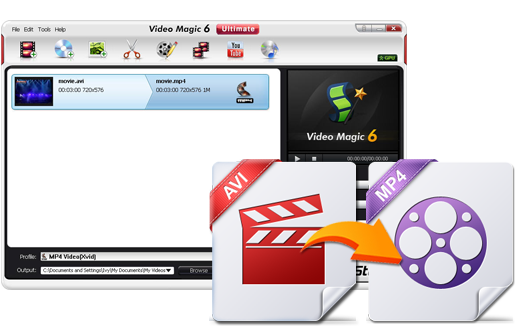
BlazeVideo Video Magic, a perfect video converter, converts FLV to MP4, converts almost all videos to MPEG-4/Xvid/ASF/H.264/H.263/3GP and HD video (AVI/MP4/MPG) for playback on various mobile devices, extracts audio from video and converts audio to MP3/MP2/AAC/AC3. Its conversion speed is above the average. With an easy-to-use interface, it makes FLV to MP4 conversion routine so simple as 1-2-3-4-5.
Step 1: Load your FLV source files by clicking "Add File(s)". Batch conversions are allowed!
Step 2: Click "Profile" drop-down list to select a suitable MP4 format, according to your portable device. Apple/BlackBerry/HTC/Nokia series, HD video and Sony PSP are supplied for choice. Here takes "Profile-HD Video-MP4" for example.

Step 3: You can reset the output folder for saving the converted files by clicking "Output-Browse".
Step 4: You can customize the MP4 video by clicking "Edit" and "Setting". The edit tools include clip, crop, watermark, subtitle, merge, slideshow. Setting allows you to reset video and audio's output parameters such as bitrates, video size, frame rate, sample rate.

Step 5: Click "Start" to convert FLV to MP4. After seconds you would get the tailored MP4 video.
Products
- TV Recorder/Player
- BlazeVideo HDTV Player
- BlazeVideo TV Recorder
- DVD Ripper/Copy/Player
- BlazeDVD
- DVD Ripper
- DVD Copy
- Music DVD Creator
- Video/Photo Editing Software
- Video Magic
- VideoFlick
- BlazePhoto
- iPhone/iPod/iPad Tools
- BlazeVideo iPhone Flick
- BlazeVideo iPod Flick
- BlazeVideo iPad Flick
- Video/DVD Converters
- iPad Video Converter
- iPhone Video Converter
- iPod Video Converter
- 3GP Video Converter
- PSP Video Converter
- BlackBerry Video Converter
- DVD to iPad Converter
- DVD to iPhone Converter
- DVD to iPod Converter
- DVD to 3GP Converter
- DVD to BlackBerry Converter
- 3GP Converter Suite
- PSP Converter Suite
- BlackBerry Converter Suite